I posted this to Facebook a few minutes ago. Almost instantly it was pulled off the site as spam. The bot claims I'm being misleading, etc. 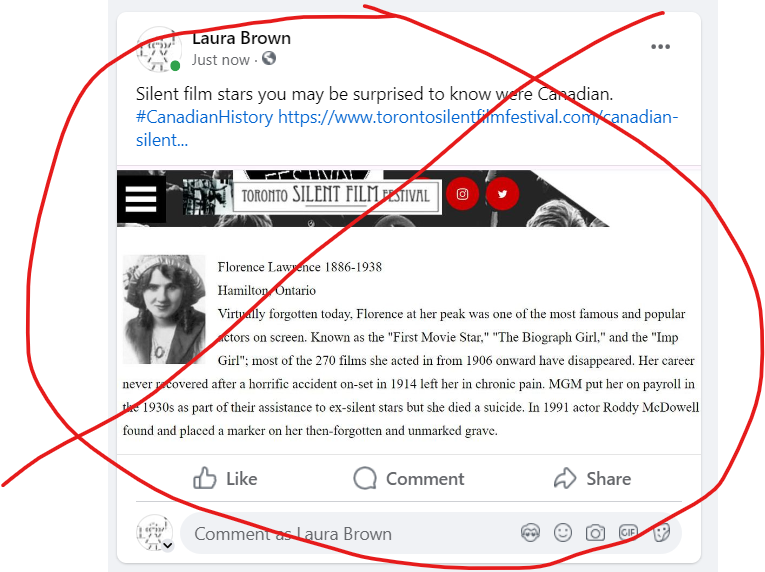
More than anything else... This may explain how my Mother's posts don't appear when she's sure she sent them to me. Thanks for protecting me from my 80 year old Mother, Facebook.
I think this is a clear sign that its time for me to stop using Facebook. My Mother just isn't that dangerous any more. I didn't think long dead silent movie stars were either.
A site asks you to allow ads on their site, to make an exception with your ad blocker. Ok, I do. Usually because I like the site and use it often.
What is the very first ad you see? An ad for an ad blocker! Of course!
Is it some form of sarcasm?
After using the site, with ads, you quickly remember why you turned on your ad blocker. The ads take over the content. I either give up using the site, find an alternative, or some other workaround. Or turn the ad blocker back on so I can use the site.
I think people who ask you to make an exception and turn off your ad blocker never go into their own site and look at it with their own ad blocker turned off. It would be a shock for them to see how much the ads take over their site. Like trying to enjoy a garden taken over by massive invading weeds. Not the odd wildflower but aggressive weeds with thorns and prickles.
If you have a site and ask people to accept ads make sure you fully know what you are asking. You could be driving people away from your site, permanently.
I miss webrings. They were a great way to find new links, interesting ideas and people. Social media is an offshoot of webrings. Most of the webring software I used to know is gone. Swallowed up by marketing. The new webrings are different, lighter, and they tend to be personal.

Sadgrl Webring Listings
I've looked at so many interesting things related to minimal web site designs yesterday and today. My mind is full of this and that. I created an idea for this site, doodled the layout I'd use. Then, I found this software, Chyrp-lite.
It has enough features to work with my old site and yet its simple to deal with. So far. I've thought others were going to work, gotten enthusiastic and then found they just didn't work for one reason or another. I wondered if I was just being too picky. Or, finding ways to nitpick and procrastinate about getting the site up again. I hope not.
Installing it wasn't difficult. Looks like it uses markup which I will have to get used to. Unless there is another option. This is my first post with the software. No problems found.
One way or another I've done what I wanted for the site layout. Not exactly as I envisioned it but its done. Sometimes I can get lost in the details and use that to procrastinate from the bigger work at hand. Not 100% wanting to start on the big picture.
I tried using the FSE (full style editor) with WordPress. I even liked the idea of it. But, at this stage its more work to deal with it than to go back to GeneratePress, which I've gotten to know and find pretty reliable. So, that's what I did. Chalk it up to a learning experience as far as the FSE editor.
I also added a contact form. Something new for me. Will see how much spam it gets and then decide if I want to keep it. I'm not even sure how it works yet. Does it need an email address? I didn't give it one. If it stays in WordPress that will work out well enough. I'm not expecting to hear from many real people versus spam, other than my Mother.
Next I will start going through all my posts from the last 20 years to update them, decide whether or not to keep some of them, and fix the broken image files on all of them. Thank you WordPress for not exporting them this time. (I'm sure it did before because I don't remember having to fix this many other times I've moved the site). Anyway, it will be like re-visiting myself, reading an old diary. Along the way I will tidy up categories and maybe even tags.
Then, what can I do about content scrapers? Nothing I've found or tried seems to work.