I make ASCII art. I started in 1998 and I still take time to type out a picture now and then. Usually, the holidays inspire me to get creative with the keyboard. Making art is a nice change from using the keyboard to type out word and sentences.
Actually making ASCII art is simple and straight forward.
Start with an empty (clean, untouched) Notepad on your computer. In MS Windows this is a plain .txt (text) file. When you open this file you can tap your mouse on the empty space to set your keyboard cursor in the right place. Go down a few lines, use carriage returns. Then use the space bar to move the cursor out towards the middle of the page/ screen. This gives you a little working space above and to the side, so you don't start typing on the first line, as if you were going to write. This time you're going to make art and you want some space over and under your cursor. Consider this blank text file to be your canvas. Don't be intimidated.
Finding Notepad on a Windows Computer
Start -> All Programs -> Accessories -> Notepad
Click Start or the Windows graphic at the bottom left on your computer. This will pull up a list of programs. Select All Programs, so you can see everything. Then go to Accessories and find Notepad on that list. Open Notepad by clicking it.
Look at your keyboard. Unless you have an old (faded and worn) keyboard (or use a language other than English) your keyboard should display everything you need right there. My own keyboard is a bit faded and worn for most of the letter characters - I've done a lot of touch typing. But, I know where things are. Still, it is easier to work with a keyboard that shows all the characters. If you want to start making ASCII art this could be a good reason to get a new keyboard, treat yourself.
Before you begin, have an idea of the picture you want to create.
I like to have a simple line drawing or clip art to work with. I often make my own doodle/ sketch if the idea has come from out of the blue, inspiration from my own mind. Having the drawing is a great help when it comes to actually creating a picture. I don't see it as stealing art when I have a drawing from someone else. I am not copying it - but using a different medium to create my own vision, my own point of view of the original drawing. Trust me, my finished creation may not look much like the original once I'm done.
When you create art with the keyboard some things have to change in order to fit in with the text medium which you are using. For instance, you can't put a line or a space exactly where you want one to appear. It has to be where the keyboard types it in. So you work with this and sometimes you can even make it work for you. Also, of course, you are working with the keyboard characters as they are. So you can't make a J just a bit taller. You can't make W thinner. You get the idea, or you soon will once you start working with all those characters.
Actually getting started is easy. You don't need any extra supplies like paper or pens or guide books or whatever else you may imagine. A fresh coffee is nice, but that's a personal touch.
Pick a place on your drawing/ sketch to start from. Look at the shape of the line.
The Shapes of Keyboard Characters
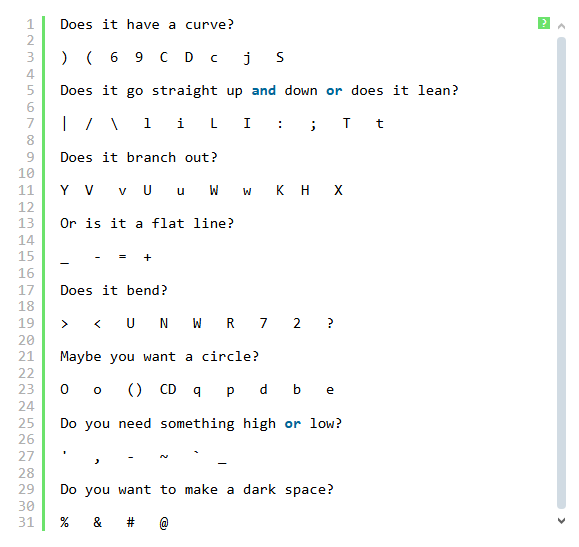
As you type above and below your original work use the space bar and your mouse to move the cursor. You will need typed spaces in your work to line things up right.
When you begin typing in the next row of your picture start by moving the cursor to the spot that matches up with the work you have already done.
Start Small
You can make an ASCII art picture in all sizes, from tiny to huge. But, start with something a bit smaller. Mainly, it's just easier to work with something that isn't sprawling across the whole screen. A small sized ASCII art picture is easier to see as a whole when you begin working on how all those keyboard characters will fit together to shape a whole, finished picture.