Posts tagged with “ascii art”
Posted on . Filed in . Tagged with .

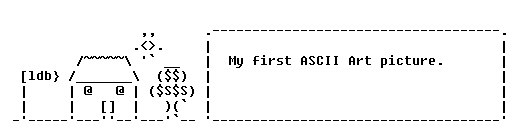
My First ASCII Art Picture

Created in 1998, when I was just getting into the ASCII Art newsgroup, this was the first ASCII art picture I finished. I thought it wasn’t too bad. But I didn’t like it. Other people in the group at the time, like Joan Stark, were making much better art. I remember many others but unless you were there at the time you won’t know them. Take a look at my ASCII art now. I’ve been working on an ASCII Art Greetings site tonight. Over 125 images uploaded and sorted into categories so far. Still many others to be added. All of them are my own work.

Posted on . Filed in . Tagged with .

Typewriter Art: Creating Pictures from Text

Typewriter art could be read as making art using a typewriter (and it's parts), or making art by typing with a typewriter. In this case, it's about making art by typing on a typewriter.

I don't know who the first typewriter artist was, or when they started. But, from what I have read, typewriters were invented in the 1860′s. I could see someone getting the idea pretty early on. Maybe they smudged a line of text and noticed how well it spread, like making a picture.

Typewriter art is like ASCII art (art created with the standard keyboard characters, usually digital/ computer based). Both typewriter and ASCII art use the keyboard characters which are visible on the keyboard layout. If you use the extra characters available it stops being ASCII art and becomes ANSI art. Both typewriter and ASCII art make pictures out of keyboard text but, they are created differently and give different results.

The big difference between typewriter art and ASCII art is not so much the typewriter itself, it's the fact that ASCII art doesn't smudge, there is no ink involved. (Unless someone prints the ASCII art, but that would be after it was created fully). Typewriter art uses all the elements of the typewriter. Artists working with a specific form of creating art will always learn the idiosyncrasies of their chosen element, typewriters (with their ink and typing ribbons) included. Not all typewriter art uses the technique of smudging the ink, that's just feature.

I'm an ASCII artist, which is how I became interested in typewriter art, but I have not tried typewriter art myself. At least not deliberately. I am old enough to have used an old, manual typewriter. There was some art form going on there, even before the creation of Liquid Paper.

Keira Rathbone: Modern Typewriter Artist

A Few Typewriter Artists from the Past

Posted on . Filed in . Tagged with .

A Simple Way to Colour your ASCII Text Art

One downside of creating ASCII art is the lack of colour. We type it into plain text and plain text comes out black on white. It’s pretty plain that way.

For most ASCII art that is fine. It keeps it simple. The focus is the art, the way it was created, rather than making it prettied up just for the sake of being prettier.

However, you can easily bring colour to ASCII art.

You will need:

  • your ASCII art picture (of course)
  • an HTML editor (or text editor with font and colour features)
  • a screen capture software
  • an HTML colour guide (not essential)

First, open the HTML editor. (I actually use Composer with Sea Monkey). Cut and paste your ASCII art into it. Make sure it shows right, change the font as necessary. You can even try a few fonts and see which gives you the look you prefer. My favourite is still FixedSys but Consolas comes in a close second.

Next, highlight your ASCII art and use the HTML editor to colour the text. This is just what you would do if you were changing the colour of a text sentence, quote or paragraph in a written post. Any HTML or text editor that lets you change the font and colour of your text will work. If not, try another one, there are lots of good, free HTML and text editors.

When your ASCII art is highlighted bring up your screen capture. (I use KSnapshot). Before you capture the image check the position of your cursor. Make sure it’s not in the picture, literally. (I still do this once in a while and have to take a second screen capture to fix it). When you’re ready, take the screen capture of the ASCII art and turn it into an image file. If you have a choice, the .png file tends to give best results.

That’s it! Of course this makes the image all one colour. If you want to make the image a light colour, change to a dark background colour. You can spend time and effort on doing more. I don’t usually. I like to keep it simple and not spend more time colouring the ASCII art than I did in creating it.

Posted on . Filed in . Tagged with .

How to Stop Emoticon Addiction

An emoticon is a terrible thing to waste.

Emoticons (aka smileys) are fun, easy and add a lightness to any email or forum posts. When you want to add emotion, feelings or mood to your typed words you can just slip in an emoticon. :) They’re so simple to make, to remember and no-fuss.

Of course, some times we use a few too many. Sometimes we forget we aren’t typing a personal email and send an emoticon to the wrong person. Sometimes we send emoticons to people who just don’t like cute little text smileys. Then, there are the times we look back at the email we just sent and notice how many of those smileys are in there.

Too much of a good thing is still too much of a good thing. If you find yourself overindulging in emoticons – start cutting back.

Are you an Emoticon Use Abuser?

Not sure how many emoticons are too many? Ask the people you send your email to. Ask the people who read your posts on forums. (If you use an emoticon with every sentence you type – that’s really too much).

You find you also type a lot of other Internet shorthand, like LOL and ROFL.

Consider why you use so many smileys. Do you really need to explain or emphasize everything you write? Chances are the smileys have become a habit and you’ve forgotten how much simpler and uncluttered your text could be without them.

How to Control your Emoticon/ Smiley Addiction

Stop using smileys in emails or forums where you don’t know everyone well. Friends are more likely to enjoy the more personal styled communication.

Skip the smiley and actually write about your feelings and thoughts. Don’t leave people guessing or making assumptions. You may even find yourself connecting much better with people once you stop relying on smiley faces to tell them how you feel.

Instead of finding new and creative smileys to use, stick with just a few and use them sparingly. Standard emoticons like :) :D and :P should be plenty. Plus, these are standard enough for the average person to know rather than needing a special education on emoticons.

Replace the emoticons with something else. Go back to punctuation like exclamations points, question marks and dashes. But, don’t over use these either. One per sentence is enough.

Avoid emoticons and smileys when you have to write (or reply to) an email with any kind of bad news or a review of a person, product or service. You need to be professional at times like this and emoticons will not give that professional, competent impression of you.

One way to really stop yourself from over using emoticons is to remove them as a type of Internet shorthand. When you type a smiley follow it with a description in brackets. For instance :) (smile face). This will slow you down and help you see just how often you really are using emoticons.
Posted on . Filed in . Tagged with .

Happy Birthday Smiley Face: 30 Years of Emoticons

Do you remember the day you first saw someone type :) or 😀 ?

I do. It wasn't 30 years ago, more like 16 years and a couple of months ago. I started online in the summer of 1996. I was an IRC (Internet Relay Chat) diva. Talking online, using a sort of bulletin board which was live over the Internet. Not a lot of people still use the IRC these days. It was lots of fun at the time.

I really began seeing emoticons when I became an active member of the ASCII art newsgroups. We didn't stop at simple smileys and emoticons though.

ASCII art are pictures created with standard keyboard characters. I've been making ASCII art since 1998. See my ASCII art gallery, ldb ASCII Art.

September 19th 2012 is 30 Years of Smileys!

If you have never created an emoticon - do it!

Some people think emoticons are dorky, too retro, too silly. No doubt there are lists of reasons you can find (or create) for not using an emoticon in your email or online comments, etc. But, emoticons are still the best way we have to include emotional direction into our typed out text.

Online, no one can see you smile

Someone reading your email can't really tell if you are cracking a joke, being serious, being sarcastic or just being a jerk. Emoticons give the essential information as to the tone and meaning behind your commentary. Emoticons are important tools for people who like to be snarky but don't really want to offend or upset others. Emoticons are great for the other side too - when you want someone to know you're serious and feeling pretty ticked off too. Your words and language may be polite but one angry emoticon can let them know you're just being polite.

Smiley Lore 😀 Scott E. Fahlman