Happy ASCII Flowers
I'm working my way up to Halloween ASCII. This idea came from a card I bought for a woman who just remarried.
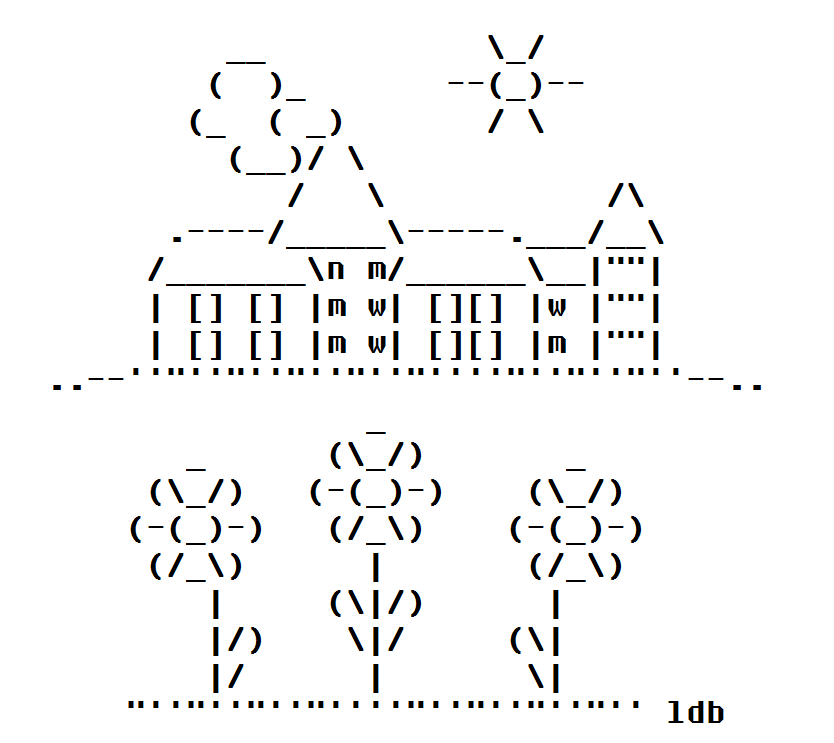
I'm working my way up to Halloween ASCII. This idea came from a card I bought for a woman who just remarried.
I make ASCII art. I started in 1998 and I still take time to type out a picture now and then. Usually, the holidays inspire me to get creative with the keyboard. Making art is a nice change from using the keyboard to type out word and sentences.
Actually making ASCII art is simple and straight forward.
Start with an empty (clean, untouched) Notepad on your computer. In MS Windows this is a plain .txt (text) file. When you open this file you can tap your mouse on the empty space to set your keyboard cursor in the right place. Go down a few lines, use carriage returns. Then use the space bar to move the cursor out towards the middle of the page/ screen. This gives you a little working space above and to the side, so you don't start typing on the first line, as if you were going to write. This time you're going to make art and you want some space over and under your cursor. Consider this blank text file to be your canvas. Don't be intimidated.
Finding Notepad on a Windows Computer Start -> All Programs -> Accessories -> Notepad
Click Start or the Windows graphic at the bottom left on your computer. This will pull up a list of programs. Select All Programs, so you can see everything. Then go to Accessories and find Notepad on that list. Open Notepad by clicking it.
Look at your keyboard. Unless you have an old (faded and worn) keyboard (or use a language other than English) your keyboard should display everything you need right there. My own keyboard is a bit faded and worn for most of the letter characters - I've done a lot of touch typing. But, I know where things are. Still, it is easier to work with a keyboard that shows all the characters. If you want to start making ASCII art this could be a good reason to get a new keyboard, treat yourself.
Before you begin, have an idea of the picture you want to create.
I like to have a simple line drawing or clip art to work with. I often make my own doodle/ sketch if the idea has come from out of the blue, inspiration from my own mind. Having the drawing is a great help when it comes to actually creating a picture. I don't see it as stealing art when I have a drawing from someone else. I am not copying it - but using a different medium to create my own vision, my own point of view of the original drawing. Trust me, my finished creation may not look much like the original once I'm done.
When you create art with the keyboard some things have to change in order to fit in with the text medium which you are using. For instance, you can't put a line or a space exactly where you want one to appear. It has to be where the keyboard types it in. So you work with this and sometimes you can even make it work for you. Also, of course, you are working with the keyboard characters as they are. So you can't make a J just a bit taller. You can't make W thinner. You get the idea, or you soon will once you start working with all those characters.
Actually getting started is easy. You don't need any extra supplies like paper or pens or guide books or whatever else you may imagine. A fresh coffee is nice, but that's a personal touch.
Pick a place on your drawing/ sketch to start from. Look at the shape of the line.
The Shapes of Keyboard Characters
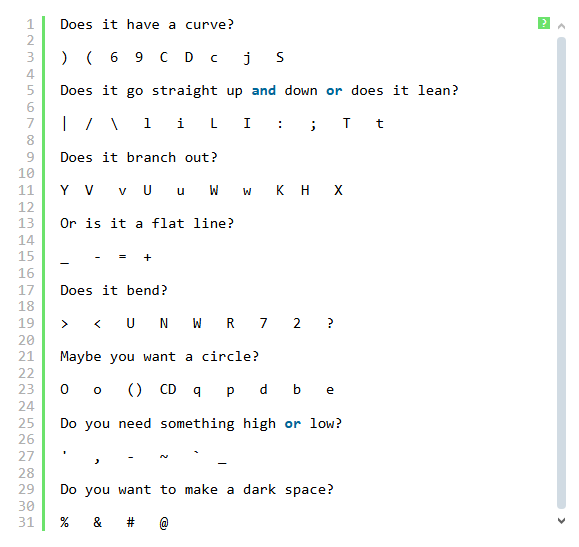
As you type above and below your original work use the space bar and your mouse to move the cursor. You will need typed spaces in your work to line things up right.
When you begin typing in the next row of your picture start by moving the cursor to the spot that matches up with the work you have already done.
Start Small
You can make an ASCII art picture in all sizes, from tiny to huge. But, start with something a bit smaller. Mainly, it's just easier to work with something that isn't sprawling across the whole screen. A small sized ASCII art picture is easier to see as a whole when you begin working on how all those keyboard characters will fit together to shape a whole, finished picture.
You don't have to be able to draw to be an artist. There are other ways and things to create with. For instance, clay, paper, thread, plants and text. Chances are you have seen art made with text. Its called ASCII art and it appears most often in email signatures. ASCII art is used to promote your website by attracting attention to the URL in your signature. But ASCII art is also a lot of fun and a challenging hobby. Of course, its not easy to get started, though you would think its pretty simple. All you need is a computer or typewriter. You supply all the creativity, ideas, skill and imagination.
To start try finding a very simple picture or just use your name. See if you can create a copy of it using the ASCII keyboard characters. If you are working on your name try using just one character and then selecting a second one to fill in more spaces. Work along that way, remove some characters when you find one that works better. That's really how I make my own ASCII art, just trying different characters to fill in spaces and taking out ones that didn't work as well. You can also look at other people's ASCII art for ideas, see how they used different characters to fill in spaces.
Don't forget to include your artist's initials. Your initials show the picture was made by you. Most people who appreciate ASCII art will keep your initials with your picture.
There are lots of places to share your ASCII art. You can have it on your personal website, make your own ASCII art gallery. People colour ASCII art and show it off in different IRC and chat channels too. There is also an ASCII art newsgroup: alt.ascii-art. The SigList is a wonderful email discussion list for ASCII art fans and artists. If you want some help making your ASCII art that's a good place to look.
Here is some basic information to help you through the usual problems people have when they start making ASCII art. Signatures, or any ASCII art you want to send through email, should be small. If you can keep it under 5 lines you're doing great. I've made some which are four lines, the acceptable standard. Also keep signatures less than 75 characters wide. Longer signatures can wrap and then they just look like a mess of text. NotePad is really the best place to make ASCII art, it doesn't open up very wide. As long as you keep your signature at a size that fits easily in NotePad you will have no trouble sending it in an email.
ASCII stands for American Standard Code for Information Interchange, the keys you can see on your keyboard. One thing all ASCII art has in common is a monospace font. This keeps it looking the same for all computers. If you are seeing ASCII art all warped, jumbled looking, try changing your font to FixedSys or Courier New. If you make your ASCII art in Windows NotePad you have the FixedSys font automatically.
 Once upon a time a signature wasn’t much more than a show of good penmanship. Now a signature can be plain, just links, maybe a quote. Signatures in HTML are colourful and fancy but too clunky for downloading with email. I like ASCII art signatures best of all. ASCII stands for American Standard Code for Information Interchange, your basic everyday keyboard characters. Its become a tradition for ASCII art to only use the characters you can actually see on your keyboard. If you get into the alt key the art becomes ANSI art.
ASCII art has been used for more than just signatures. MUDs, IRC chat, ezines and of course newsgroup and email postings have used ASCII art and emoticons (smileys). Some people have printed out the bigger pictures for kids to colour. One thing all ASCII art has in common is a monospace font. This keeps it looking the same for all computers. If you are seeing ASCII art all warped, jumbled looking, try changing your font to FixedSys or Courier New. When ASCII art is included in a webpage it needs the HTML tag pre and /pre to keep the characters arranged with all the spaces in place.
Signatures should be short but not too cluttered. If you can keep it under 5 lines you’re doing great. I’ve made some which are four lines, the acceptable standard. I think the netiquette police aren’t so concerned with the length of ASCII signatures now that HTML is getting more popular. Still, you don’t want to annoy people with your signature, usually. Keep signatures less than 75 characters wide. Longer signatures can wrap and then they just look like a mess of text. Don’t forget to include your URL and if you use ASCII art, the artist’s initials.
In July 1996 while still a Net newbie, I thought the pictures made with keyboard characters were amazing. Making the pictures myself seemed so out of reach. I didn’t even know what they were called. I searched for keyboard art, typewriter art, anything and everything I could think of. I didn’t find what I was looking for. Finally, I found a site answering newbie questions and they emailed back and told me: ASCII Art! The mystery was solved!
I made my first keepable picture January 1998 (with the help of Albert and Joan on the Sig-List). ASCII Art became my special outlet for the drawing I have always wished I could do. Its been a few years and a lot of ASCII later. I have some signatures I especially like, some art I enjoy sharing on my personal site and a few really great ways of promoting my projects online. People notice ASCII art. Not everyone has my appreciation of it, but it does get noticed. Some people, like my husband, say it’s outdated, a throwback to the 70’s. Little does he know, ASCII Art is still evolving and it started on typewriters, not computers.
ASCII art isn’t using a program to turn a graphic into ASCII text. Anyone can open a program, that’s not art. ASCII art is created when someone uses a minimal amount of data to represent an object. Of course, its not always easy to see, the whole eye of the beholder thing… But its really impressive what some people can do with just a few keyboard characters and a lot of imagination and creativity.
This was originally posted to the BackWash site, October 12, 2001. I wrote there several years before the site closed.