Posts in category “Internet Unplugged”
Posted on . Filed in . Tagged with , .

Using your Voice Online - Part Three

You've made a great website, you feel quite proud of it and now you want people to find it. No problem, website promotion is pretty easy and kind of fun too. Everyone knows about using search engines but there are other things you can do to promote your site: ad exchanges, signature files, awards, webrings, newsletter and word of mouth. For some of them you need to access the html code for your website.

Starting with the search engines one thing you will need to do is create meta tags. Meta tags are what the search engines and web browsers read in the html code of your site. You won't see it on the page itself, its just part of the behind the scenes code. Get meta tags from another site, just use your web browser. Right click on a bare space on the webpage and choose View Source from the window that comes up. Change the information to your own information and paste the new code into your own html code. Don't forget to save the file when you're done.

Now you're ready to submit to the search engines. You can save yourself some steps by going right to the places the search engines get their content Dmoz.org and Zeal.com. Take the time to look for just the right category for your site. If you have a special personal interest look for that category and submit your site with the title, URL and a description. It may take awhile for your site to turn up in the directory but once it does the other bigger search engines will pick it up too. Or you can submit to all the search engines you can find. There are lots out there. Some only list certain kinds of sites, about certain topics or from specific countries.

Here is one of the more fun things you can do, I think. Its making a signature file for all your email, newsgroup or message board posting. Try to keep the signature file no more than 4 or 5 lines of typing and less than 65 typing characters wide. That should fit in most email readers without becoming warped. Also, many people become annoyed if a signature is longer than the original post made to the newsgroup or message board. If you only have one or two URLs to add for your website think about adding something fancier.

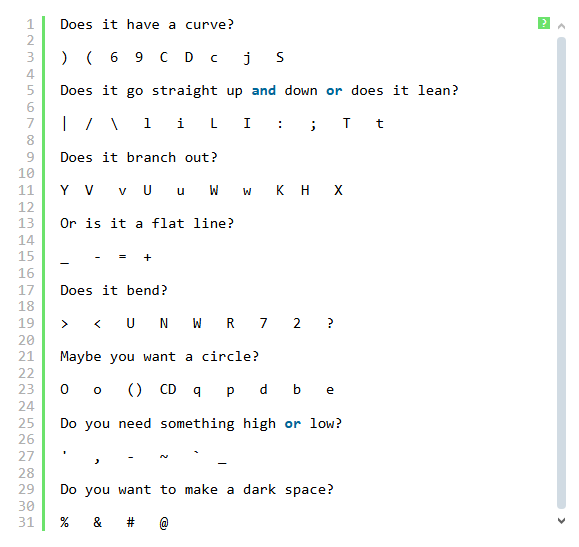
ASCII art and figlets have been added to signatures for years. There is a lot out there to choose from. Likely you will find something related to your site or just appealing to you. Make sure it fits into your signature file and check to see that it doesn't get too long and warp when you send it to someone. Another thing people use in signature files are quotations. Have you heard a quote you especially liked? Short quotations are easy to fit into a signature file. If you need to know how to use the signature file in your email or news reader check the help files that come with it. Most of them will tell you step by step how you can add a signature automatically to each message you send out.

Would you like to win an award for your site? Chances are good you would. So would other kids with personal sites. If you can do a little work with graphics or find one somewhere you can create an award for other sites. First, decide on what the award is for. Most colourful site, most boring site, best personal site by a kid, etc. Try to find some unique idea that fits into the content of your own site. Its an award from your site so it should have something to do with your site. The key to having a website award as a promotion for your own site is that they link back to you when they put the award on their site. Once you have your graphic put it up on its own page with a description of what the award is for and how you decide who wins it, also how often you give out the award. Then include the link to the page the award is on at your site. Make sure anyone applying for your award knows they must link back to your page if they want the award on their site. Keep track of who has your award, its a good idea to add their URL to a list of winners which you keep on your site. This also encourages more people to get your award as both of you will have your URL promoted. Your URL will be on their site and their URL will be on your site.

Maybe you can't make a graphic or can't think of a good idea or theme for the award. You can look at webrings. Joining a webring is just a matter of adding a bunch of html code to your webpage. Go to Yahoo, RingSurf or one of the other webring directories and see what topics you can fit into. There are rings for personal sites by the dozens, look for one about kids or something especially relevant to the contents of your site. Webrings work by bringing traffic to your website as people browse all the sites in the ring. It doesn't matter if your site is number 99 in the ring, people can start from anywhere in the ring, not just from the first site. Don't join a ring that's too small unless you especially like it for some reason. Small rings will take time to build up, if they ever do. The webring owner has to keep watch over all the links and make sure each one has the html displayed on their page. Its takes a lot of time to manage a webring, its easier to just join one or two someone else is managing.

Would you like to publish a newsletter? It can be a whole newsletter, your own publication with frequent updates, or just an announcement list to let people know you have updated your website. Free email lists and newsletters are available at Yahoo and Topica.com. Its pretty simple to set up your own email list there. All you really need is a URL and description for your website. Decide what you want the list to be. If its going to be a discussion list it will need promotion too. But this kind of list is also great for exchanging ads with other kids who have newsletters/ discussion email lists or ezines. Just as with the website awards you trade links and link back to each other. This time its in the content of your newsletter instead of on your website.

Keep track of who you trade links with or submit links to. You can keep a file with the description you prefer for your website right on your computer. Then when an opportunity comes for some promotion you just need to cut and paste the information. That makes the whole thing much easier.

The last promotion idea I'm writing about today is word of mouth. That means telling your family, friends and anyone else who could possibly be interested in seeing your site. Look for opportunities online. If you read another site sign their guest book and make sure you add your URL in the space provided in most guest book forms. If you read an email list make sure your signature file is working so others reading the list will see your URL and be curious enough to click on it. When you are chatting online offer your URL to the friends you make. Put your URL on your school books, on penpal letters, anything you can think of that won't get you into trouble. Be creative and have fun with it. Watch your web counter and see how many people are visiting your pages.

Posted on . Filed in . Tagged with , .

Using your Voice Online - Part Two

With 26 letters you can make endless words and a never ending amount of sentences. Emotions can be expressed. Points can be discussed. All from those same letters. When you know what you want to say and where you want to say it next its time to think of how to say it. What tone will you set? Will you write with humour, in essay style or a personal journal. Some people use freeware online such as the weblogs from Blogger to do most of the formatting work on their site. Another good method for making the work simpler is the html editor that comes with the two main web browsers. I like FrontPage Express but you might prefer Netscape's Composer. There are many other html editors around most aren't free.

Before you start to write, look at the basic rules of grammar and punctuation. If there is something you didn't know or have been doing wrong just make a note of it. Learning from your mistakes is all part of being a writer. It seems to be a trend online to forget to use punctuation. It looks sloppy, as if they don't really care about their writing or what they have to say. Writers who value their voice take care of it and want to make a good presentation.

One part of writing that computers and technology have made easier is proofreading. Just use a word processing program to check for spelling, typos and grammar mistakes. You can also find a spellcheck feature in other programs like email. Don't rely on only spellcheck, its a back up for your own proofreading. Spellcheck doesn't catch everything. Its best used to check your writing after you have gone over it yourself.

Once you've written some great content you're ready to load it onto your web space, create a layout and add graphics. Graphics aren't essential but they do add colour, character and interest to the text. Start with a white background and black print or experiment a little. Don't go too far. Text needs to be easy on the eyes and easy to read. You can enlarge and colour titles while leaving the body of your content in plain black and white. These are easy things to do and they don't take much longer to load than the plain text.

Adding graphics is where you need to use caution. You can add small graphics, small in file size not in dimension. Smaller files use fewer pixels and load faster. If you want to use more graphics don't put them on your front/ index page. Let the first page be fast loading and an introduction to your site and a simple index of the contents.

Layout is made fairly simple with the use of tables. Tables are made of cells, rows and columns. These can each be moved around, deleted or added as needed. You may have an html editor which lets you choose from templates where the layout is already set up for you. Unless you want something unusual these templates work well, especially when you are just beginning and have a lot to figure out. If you don't have a template you can look for some online or make one of your own. Pick a website where you like the layout, the way everything is displayed and how the navigation is set up. Then, in your web browser, right click the page and click "View Source". This lets you see the html for that page. Cut and paste this into a text file. Put this html into your html editor and use it like a frame to create your own site and layout. You can even give the site credit for your layout. This could benefit you too, if they link back to you.

Make sure all the links to your content pages work and each page links back to the index or onto the next page of content. Linking pages gives your readers a choice of how they want to navigate your site's content. At the bottom of every page on your website consider having a bar with a short version of the index. Make links to your index, a biography for yourself, a way of contacting you (email address) and whatever else seems relevant or important to you. Navigation is very important. Its worth the time it takes for you to check every link on your pages. Make sure none have a typo which will give readers an error message.

Last of all, load your content to your chosen web space. If you are using one of the big free space providers like Geocities or Tripod this is fairly easy. Instructions are on their site, basically you find the file on your computer and send it to their site. If you are doing things with ftp you will need software for this. If you have a problem help is never too far away on the Internet. Many people will know ftp (file transfer protocol).

So now you are all loaded and ready to go. Your page is online, everything works and it looks pretty great. You'll probably make a few changes here and there, twitch that and move this. There are always small things you notice or second guess as you go along. One thing is still missing, readers!

Next time I'll write about website promotion. Post questions to the message boards. I'll be glad to help

Posted on . Filed in . Tagged with , .

Using your Voice Online - Part One

One of the best things about the Internet is how it gives all kinds of people a voice. Whether they use that voice for good or ill is up to them. The Internet is full of voices to choose from. Would you like to add your own to them? Its not hard and you can do it for free.

First thing you need is a website. The best, in my opinion, are Tripod or Geocities. Register for free space which gives you an email address also. The hard part is finding a user name. These sites have so many people using the service almost all the easy names are taken. Get creative, see what you can come up with. If you get impatient just add some number to your user name of choice. When you choose a name and a password write them down in a place they won't be lost. You can email them to your family or friends if you don't mind them having that information. I think the best thing is to write them in your diary, if you have one.

Now you have the space to display your voice, what will your voice be? Brainstorm, write a list with your interests, hobbies, the sort of person you are, whatever comes to mind. Then take a look at what you have written. Choose which are the most important to you or which you would most like to write about and have read by other people. Try to narrow it down to five or less. This gives you a focus which is important if you want to find an audience for your voice. People want to have some idea of what you will be writing about. If they like it they will be back for more.

Maybe you will only write for a small audience, just family and friends. That's a good way to start. A newsletter with interviews, news, a feature topic and links can be sent out once a month or weekly if you really have the time and ambition. Once you have settled on your content its time to think of your layout, how you will present the content. One of the most important things for any website is navigation. Think of how people will go from one part of your site to the next. Remember to link each page back to your main page or whatever index you have for the publication you are creating. When you pick out colours and graphics they should be easy on the eye and easy on the web browser. How long do you usually like to wait for a webpage to load? Likely its not more than a few seconds. Another thing to remember is that not everyone has a really good Internet connection. One other thing about layout, make sure its easy to read. Colours for background and text need to be contrasting and not colours that make your eyes water. Try a white background and a dark text to start with. Later you can try different combinations and get reader feedback about them.

Now its time to write. How will you start? Here is where you really use your voice. What do you have to say?

Next week I will write about writing for your personal website or ezine. Take this time between to plan out the contents and layout for your site. Use the message boards to ask questions or share information with others. Good luck.

Posted on . Filed in . Tagged with , .

ThemeStream is Closing

The big news today is actually two things. First: ThemeStream is closing down. All the writers need to pull out their content before it goes bye bye. I think its a good thing for all the ezines out there. Now all those writers can give their articles to ezines who will appreciate it more and give better promotion to the writers. Its just a good thing all around.

The other news is about Yahoo. They are now aspiring to be the porn capital. Really makes they look like idiots (a nice word for it) after all the years they have deleted sites for having adult content. Even sites which were Wiccan/ Pagan or sites which wanted to give information about sexual fetishes to keep people from being hurt. The real question now is: will Yahoo change their policies for sites on Geocities. Or will Yahoo be afraid of the competition?

I just posted to never never land, I guess, its gone at any rate. This time I'm going to paste it into Notepad before I hit that Post button.

I was at About.com today, the Screenwriters topic is open but it doesn't interest me. I sent it into InkSplatters for someone else to step into, hopefully. I like to hear I helped someone on the list.

I did find an interesting topic available at Suite 101. Its not a big payout site, but the topic is interesting and doesn't sound like a huge time commitment. Its Websites for Women with a monthly article and a database of links. The past manager left in December so its been available awhile. Likely I will be accepted. I think the topic has a lot of potential. I frequently find sites run by women who are doing interesting things online. Some with home businesses and some in creative pursuits, others starting up an offbeat club or a club based on a personal interest.

I was just looking around at WebSeed Publishing. Its kind of an odd site when you look at the scatterings of topics. Some topics like writing are so covered they overlap to the point where you really can't tell one from another. I've applied for one topic but didn't get in. They said they weren't opening that area at the time. Yet, now I can see there are a few near misses. I've sent in another email and will see what happens. Today, I thought about going for an ASCII Art topic. But the focus may be too narrow. Besides, there just aren't any books and gadgets to sell related to ascii art. Blogger was down this morning. Lets see if its up and at em now. :)

Just lost the entry I made. I had the editor open too long and I guess my login to Blogger died. :( Basically I said HerPlanet is tossing DialTone as the new server. They must be pretty incompetent after two weeks of paid overtime and still not getting the HerPlanet sites loaded and working. Now we are transferring to a new server which is through one of the HerPlanet network managers. I'm even going to try loading up my own site. I'm not an ftp novice but I'm hardly an expert. I learn from my mistakes but that means you have to make plenty of mistakes to learn from.

This is kind of neat. Make your own license plate.

Posted on . Filed in . Tagged with .

ICQ Chatting

Usually I leave ICQ undisturbed in my hard drive. Its great when I'm away and want to talk to Todd, a definite long distance savings. But its kind of useless now that I'm back here and on my own computer again. If my family get using it that would be great. But, so far, its just gathering dust. The women from the HerPlanet site use it to chat but when I look few of them are set on for chatting. If someone is there I'm not really in a chatty mood at the time. The only people making real use of my ICQ are the trolls signing themselves up as "friends". I have it set to let anyone sign up. Its much easier than having to bother rejecting them all. I don't care if they need another notch on their belt to feel better. I've never talked to any of them so it works both ways. Maybe there is some way to delete them from the ICQ site, I might do that, just to be contrary. ;)

I found a nice site called Smiley Divas, part of a Calgon promotion. I especially like smiley graphics so I grabbed a bunch from the site for my desktop. There is a screensaver you can download too. Nice job Calgon. :)

For some reason I'm still signed up with Etour. Its one of those get paid for surfing things but you actually get gift certificates instead of cash from them. I think it should have worked out better than it has. The problem is likely the competition from the cash paying sites which would look more attractive. But, I thought Etour's way of doing things had a better chance of actually paying its users. It has too. I've had a couple of gift certificates from Barnes and Noble. Lately they have been getting less sponsors. Its a first come first serve basis now when you are ready to redeem your points.